Ledger Nano X Guide: Setup, Price & Buying (HK)

Updated: 2026/03/12  |  CashbackIsland

Ledger冷钱包终极指南:Nano X教学、香港价钱及购买攻略一篇搞定

Ledger Cold Wallet Ultimate Guide: Nano X Tutorial, Hong Kong Price and Buying Guide in One Article

In recent years, the cryptocurrency market has been highly volatile. Incidents such as exchange collapses and asset misappropriation occur frequently. Have you also begun to worry about the security of your digital assets stored on trading platforms? Placing all your wealth on an exchange is essentially the same as handing your hard-earned money to others for safekeeping, which carries extremely high risk. This article serves as your one-stop guide to entering the era of asset self-custody. We will provide an in-depth breakdown of the Ledger cold wallet, covering core security concepts, model selection, and a step-by-step Ledger Nano X tutorial. We will also compile the latest Ledger Hong Kong price information and official purchasing channel analysis, allowing you to truly control your private keys, reclaim ownership of your assets, and invest with peace of mind. 

Why Do You Need a Ledger Cold Wallet? Understanding the Key to Asset Security

In the cryptocurrency world, “Not your keys, not your coins” is a golden rule that everyone should remember. Storing crypto assets on centralized exchanges may be convenient for trading, but in essence it means handing over control of your assets to a third party. Once an exchange suffers a hacker attack, operational failure, or even internal misconduct, investors may lose everything. The Ledger cold wallet is the ultimate solution to this problem.


Cold Wallet vs Hot Wallet: Security and Convenience Comparison

To understand the value of Ledger, you must first distinguish between cold wallets and hot wallets. The biggest difference between the two lies in “whether the private key has ever been exposed to the internet”.

  • Hot Wallet: Usually refers to mobile apps or browser extension wallets, such as MetaMask. Their private keys are stored on internet-connected devices. Although they allow convenient and fast transactions and interaction with DApps, they are also exposed to risks such as hacker attacks, phishing websites, and malware. It is like the wallet you carry daily, convenient but not suitable for holding large amounts of cash.
  • Cold Wallet: Also known as a hardware wallet, such as Ledger. It is an offline physical device specifically designed to store private keys. All transaction signing (authorization) is completed within this offline device, and the private key never leaves the device or touches the internet. This significantly reduces the risk of remote theft. It is similar to a bank vault, offering the highest level of security.

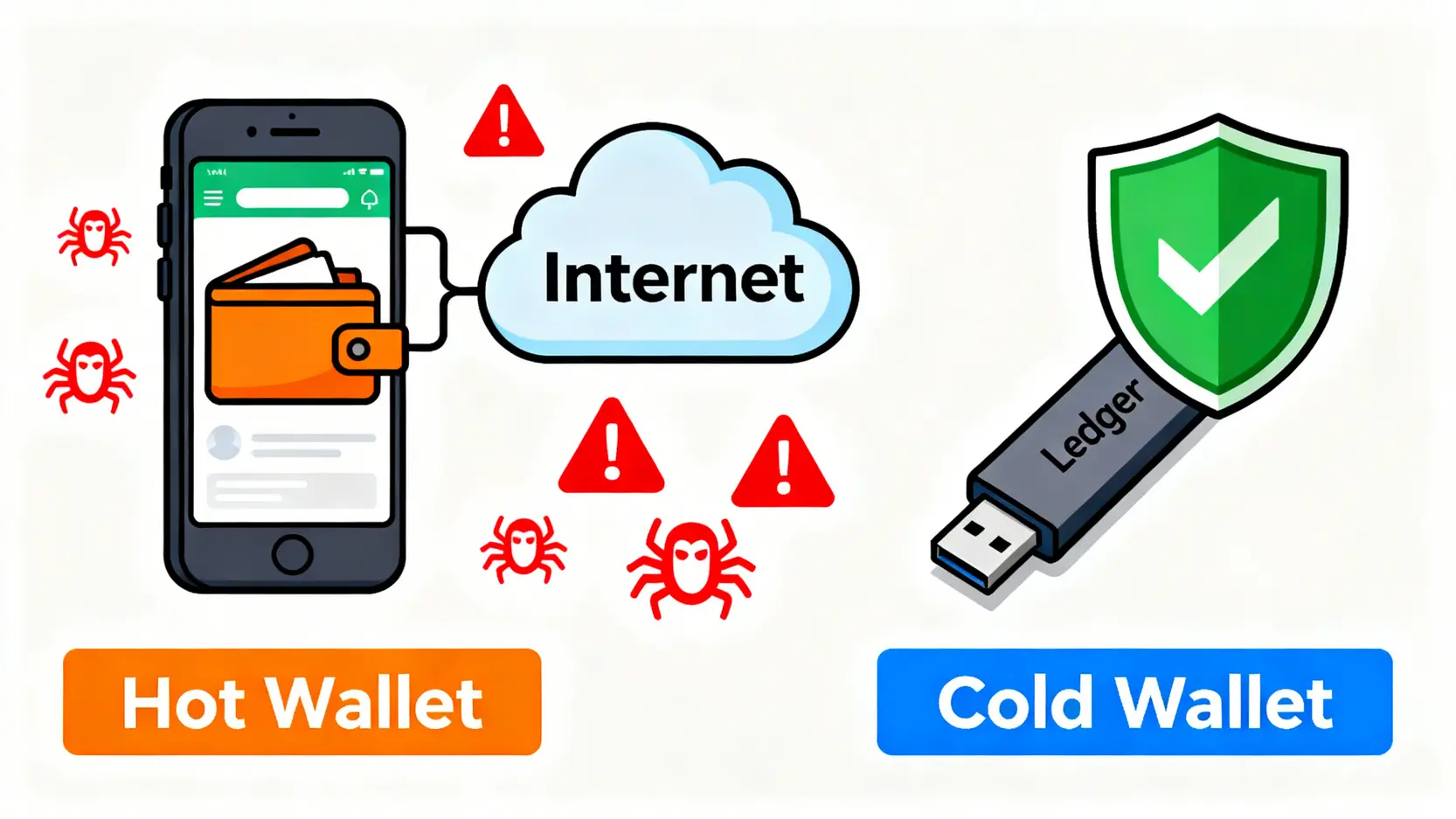
冷钱包与热钱包的安全性对比图,展示了热钱包连接网络的风险与冷钱包离线储存的安全性。

A cold wallet stores private keys offline, similar to a bank vault, while a hot wallet is exposed to risks due to its internet connection.

Below is a simple comparison table:

Features Ledger Cold Wallet Hot Wallet (e.g., App Wallet)
Security Extremely High (Private Keys Stored Offline) Lower (Private Keys Stored on Internet-Connected Devices)
Convenience Average (Requires Operating a Physical Device When Trading)

High (Transactions Can Be Conducted at Any Time)

Use Cases Long-Term Storage, Large Asset Holdings

Daily Trading, Small Payments, Interaction With DeFi

Asset Sovereignty Fully Controlled Self-Controlled (but Vulnerable to Attacks)


Ledger’s Core Technology: How the Secure Element Protects Your Private Keys?

The reason Ledger can provide bank-level security lies in its built-in “Secure Element (SE)”. This chip is specially designed with anti-tampering capabilities and is of the same security standard as the chips used in passports, credit cards, or SIM cards. Once your private key is generated, it is stored inside this chip and completely isolated from the outside world. Even if your computer or mobile phone is infected with malware, hackers cannot steal the core private keys stored inside the Ledger device through the internet. Every time you want to send assets, the transaction request will be sent to the Ledger device. You must confirm the transaction details on the device screen (such as the amount and address) and press the physical button to authorize it. This “signing” process is completed within the Secure Element before the authorization result is broadcast, ensuring maximum security.

Ledger 安全芯片运作原理示意图,展示私钥如何在不离开装置的情况下完成交易签署。

Ledger’s core security mechanism: transaction signing is completed within an isolated Secure Element, and the private key never touches the internet.


Ledger Model Comparison: Nano X vs Nano S Plus, Which One Should You Choose?

Currently, the two most popular models on the official Ledger website are Ledger Nano X and Ledger Nano S Plus. Both offer top-tier security, but there are differences in functionality and user experience, which also directly affect their Hong Kong prices. How you choose depends on your personal needs and budget.


Feature, Supported Coins, and Price Comparison Table

To help you understand at a glance, we have compiled the following detailed comparison table:

Features Ledger Nano X Ledger Nano S Plus
Connection Method USB-C, Bluetooth USB-C
Screen 128 x 64 pixels 128 x 64 pixels (Larger and Clearer)
Battery Built-in Battery (8 Hours) None (Requires Power Connection for Use)
Storage Capacity

Approximately 2MB (Can Install up to 100 Cryptocurrency Apps)

Approximately 1.5MB (Can Install up to 100 Cryptocurrency Apps)
Supported Coins 5,500+ Cryptocurrencies and NFTs 5,500+ Cryptocurrencies and NFTs
Official Price (Reference) ~US$149 ~US$79
Suitable Users Active Users Who Need Mobile Operation and Manage Multiple Assets Beginners With Limited Budget Who Mainly Operate on a Computer


Beginner Recommendation: Which Ledger Should I Buy?

For this question, the answer is highly personal:

  • Reasons to Choose Ledger Nano X: If you are an active cryptocurrency investor who holds multiple different coins and wants to manage your assets anytime and anywhere through your mobile phone (such as transferring funds on the street or interacting with DeFi platforms), then the Nano X’s Bluetooth function and built-in battery will provide great convenience. It is the flagship option with the most comprehensive features.
  • Reasons to Choose Ledger Nano S Plus: If you are a beginner of cryptocurrency investing whose assets are mainly concentrated in a few mainstream coins such as Bitcoin and Ethereum, and you operate mostly on a computer, then the Nano S Plus is definitely the most cost-effective choice. It has the same level of Secure Element and large screen as the Nano X, but lacks Bluetooth and a battery, while the price is much more affordable.


Further Reading (Highly Recommended)

[2025 Hong Kong Cryptocurrency Exchange Recommendations] SFC-Compliant Exchange Guide

[What Is Litecoin?] 2025 Beginner Guide: LTC Introduction, Advantages and Disadvantages Analysis, and 3 Major Ways to Buy …


[Step-by-Step Tutorial] Complete the Ledger Nano X Setup in 5 Easy Steps

After receiving your brand-new Ledger device, please strictly follow the official procedure to complete the setup. This is the first step in protecting your assets. Below is a detailed Ledger Nano X tutorial. The setup process for Nano S Plus is largely the same.


Step 1: Unboxing Inspection and Ledger Live App Installation

First, check whether your Ledger packaging is intact, especially whether the seal is complete. Ensure that the device is brand new. Next, do not use any unknown links. Please go directly to the official Ledger website to download the latest version of the Ledger Live application (which supports both desktop and mobile versions). This app is the unified interface for managing your assets. 

Step 2: Set the PIN Code and Write Down the 24-Word Recovery Phrase

Connect the Ledger device to your computer. After powering it on, follow the instructions on the screen. First, you need to set a PIN code consisting of 4 to 8 digits. This is the password required each time you unlock the device.

⚠️ The most important step: The device will generate a “Recovery Phrase” consisting of 24 English words. You must, must, must use a pen and paper to accurately write down these 24 words in order on the recovery phrase card provided. Then store this card in an absolutely secure, fireproof and waterproof place that only you know.

  • Strictly prohibited: Taking photos of the recovery phrase, screenshots, saving it on a computer or mobile phone, uploading it to any cloud storage, or sending it through messaging software. Any digital storage method carries the risk of being hacked!
  • The only backup: These 24 words are the only backup of your assets. If your Ledger device is lost or damaged, you can use these words to restore all your assets on any new Ledger or other compatible wallet. Conversely, if anyone obtains your recovery phrase, they will be able to steal all your assets.

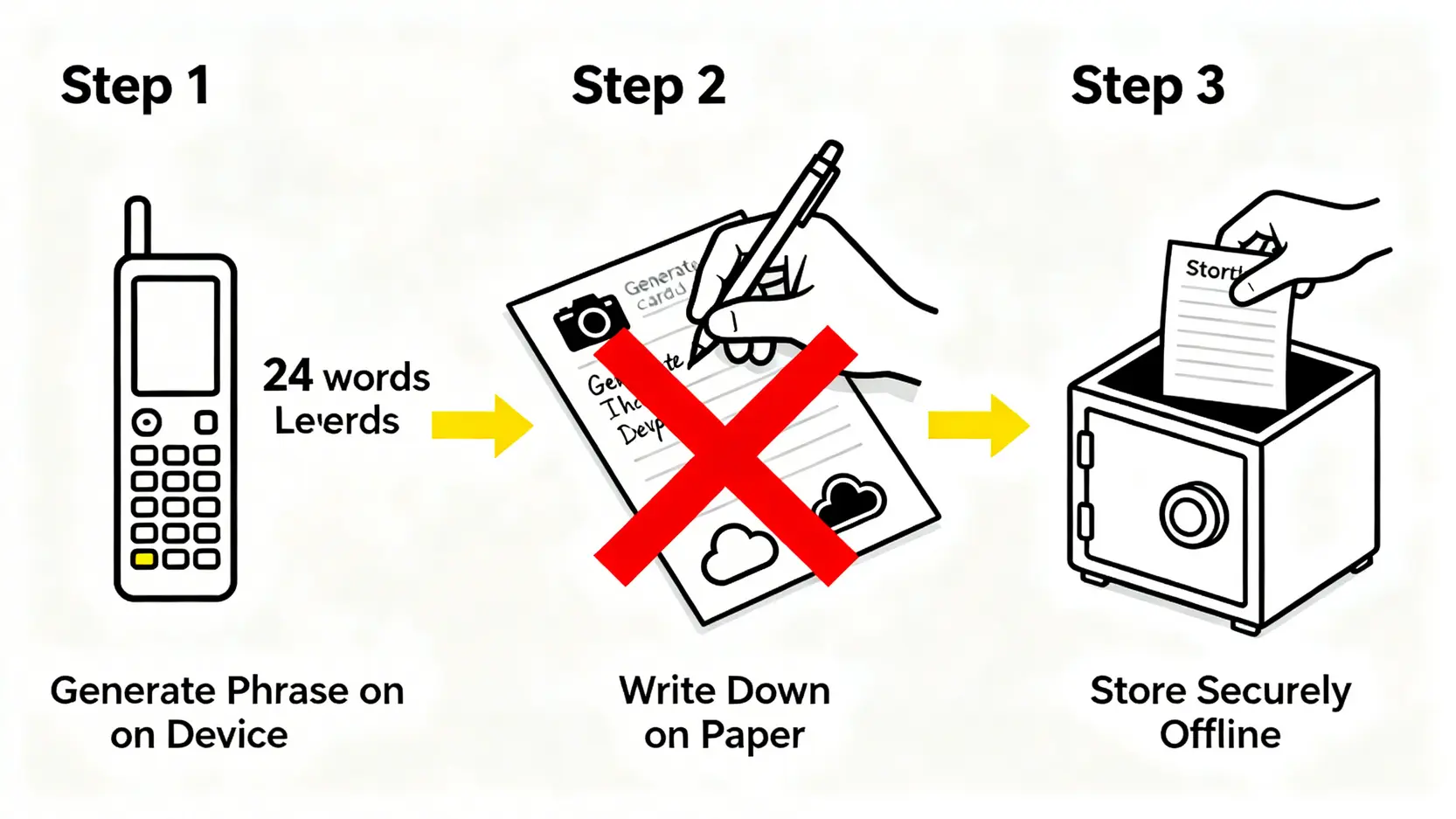
正确备份 Ledger 恢复助记词的三个步骤流程图,强调必须用纸笔抄写并离线储存。

The recovery phrase is the ultimate protection of your assets and must be handwritten and stored in an absolutely secure physical location.


Step 3: Connect Bluetooth and Pair With Your Mobile Phone

If you are using the Ledger Nano X, after completing the recovery phrase backup, you can choose to enable the Bluetooth function. Open the Ledger Live App on your mobile phone, select to add a device, and proceed with Bluetooth pairing. The pairing code will appear on both the mobile app and the Ledger device screen. After verifying that they match, confirm the pairing. This allows you to connect your phone wirelessly for convenient management.


Step 4: Add Accounts in Ledger Live (BTC, ETH) and Receive Assets

After completing the setup, you need to install the coin applications you want to manage in the Ledger Live App (such as Bitcoin or Ethereum).

  1. In the “Manager” section of Ledger Live, find the coin application you want to install and click install. You will need to authorize the installation on your Ledger device.
  2. After installation, go to the “Accounts” section and click “Add account”. Select the corresponding coin, and the app will guide you to confirm on the device before creating an account for that coin in Ledger Live.
  3. Enter the account you have just created and click “Receive”. Ledger Live will generate a receiving address. You must verify this address on the Ledger device screen. After confirming that it is correct, you can copy the address and send it to the other party or withdraw coins from an exchange to this address.


2026 Ledger Hong Kong Price and Official Purchasing Channel Analysis

After understanding how to use it, the next question everyone cares about is how to buy Ledger in Hong Kong and what the price is?


Ledger Official Website Price and Shipping Details

The safest and most recommended purchasing channel is always the official Ledger website. This ensures 100% that the device you receive is a brand-new product that has not been opened or tampered with. The official website price is usually listed in euros or US dollars. Shipping to Hong Kong requires paying international shipping fees and may also involve import duties. Although the waiting time may be longer and the process slightly more complicated, it is the most worthwhile investment for the sake of asset security. 

Comparison of Authorized Hong Kong Resellers and Important Considerations

Besides the official website, Ledger also has authorized resellers around the world. In Hong Kong, you can check the authorized local retailers through the official Ledger website. The advantages of purchasing from an authorized reseller include:

  • Faster delivery: Stock is usually available and the device can be obtained immediately or very quickly.
  • Transparent pricing: The selling price already includes all shipping fees and taxes, making it clear at a glance.
  • Convenient after-sales support: If there are any issues, you can communicate directly with the local retailer.

Note: Before making a purchase, be sure to verify on the “Resellers” page of the official Ledger website whether the merchant is officially authorized. Never trust any “agents” from unofficial channels.


Avoiding Pitfalls: How to Identify a Second-Hand or Tampered Ledger Device

Security is the top priority when using a cold wallet. You must be extremely cautious when purchasing to avoid buying a device that has been tampered with.

  • Reject second-hand devices: Never purchase a Ledger from Carousell, Facebook Marketplace, second-hand trading platforms, or unofficial electronics stores. These devices are very likely to have been tampered with.
  • Check the packaging: When you receive the product, carefully inspect whether the plastic seal on the box is intact.
  • Beware of preset PIN codes or recovery phrases: If the device asks you to enter a preset PIN code when you open it, or if the package contains a “pre-scratched” or “already filled in” recovery phrase card, this is definitely a trap! Scammers intend to trick you into depositing assets into a wallet whose private key (Recovery Phrase) they already know. Stop using the device immediately and contact the seller.
  • Generate the recovery phrase yourself: A genuine new Ledger device will always require you to personally set the PIN code and generate a brand-new and unique 24-word recovery phrase when you power it on for the first time.

With the growing risks associated with cryptocurrency exchanges, equipping your assets with a Ledger cold wallet is one of the most effective ways to protect your wealth. 

FAQ: Common Questions About the Ledger Cold Wallet

Q: What should I do if my Ledger device is lost or damaged?

A: There is no need to worry. Your crypto assets are not stored on the Ledger device itself but are recorded on the blockchain. The Ledger device simply stores the “private keys” that allow access to these assets. As long as you have safely kept the 24-word recovery phrase that you wrote down earlier, you only need to purchase a new Ledger device (or another compatible hardware wallet), choose “Restore from recovery phrase”, and enter your 24 words to fully restore all your accounts and assets.

Q: Which cryptocurrencies does Ledger Nano X support?

A: Ledger supports more than 5,500 different cryptocurrencies and tokens, including Bitcoin (BTC), Ethereum (ETH) and all ERC-20 tokens within its ecosystem, Binance Smart Chain (BSC) BEP-20 tokens, Solana (SOL), Cardano (ADA), Ripple (XRP), and most other mainstream assets. It also supports the secure storage of NFTs. You can check the complete supported list on the “Crypto Assets” page of the official Ledger website.

Q: Can I perform staking on Ledger?

A: Yes. Through the Ledger Live application, you can securely stake multiple Proof-of-Stake cryptocurrencies, such as Ethereum (ETH), Solana (SOL), Tezos (XTZ), and Cosmos (ATOM). During the staking process, your private keys remain securely stored inside the Ledger device and are never exposed to network risks, while allowing you to earn passive staking rewards, making it an ideal choice for long-term investors.

Q: Do I need to pay a monthly fee after purchasing Ledger?

A: No. The Ledger hardware wallet requires only a one-time hardware purchase cost and does not have any ongoing monthly or subscription fees. Once you purchase the device, you can permanently use its core storage and transaction signing functions. The Ledger Live application is also completely free to download and use.


Conclusion

In summary, in a cryptocurrency world filled with unknown risks, investing in a high-quality Ledger cold wallet is a wise decision to safeguard your digital assets and an important step in transforming from a speculator into a mature investor. This article has provided a complete Ledger Nano X tutorial and a detailed analysis of the different purchasing options and price considerations in Hong Kong. Remember that securely storing your 24-word recovery phrase is the most critical and core element of the entire security system. Take action now and build a truly secure and unbreakable fortress for your digital assets that belongs entirely to you.

If you liked this article, please share it!

Related Articles

  • Volatility Surface Guide: Skew Trading Strategies
    Practical Applications of Volatility Surfaces: From Options Modeling to Advanced Skew Trading Strategies In options markets, implied volatility is never a flat line. Instead, it forms complex "smile" or "skew" surfaces. For advanced traders, mastering the practical applications of volatility surfaces is equivalent to possessing a lens that reveals market...
    2026 年 6 月 3 日
  • Foreign Capital Flow Model: Track Institutional Money
    Building a Foreign Capital Flow Copy Trading Model: A Stock Market Indicator for Accurately Tracking Institutional Positioning In Asia-Pacific stock markets, foreign capital inflows and outflows often determine the direction of the index. However, simply looking at daily net buy and sell data is no longer enough. Only by building...
    2026 年 6 月 3 日
  • Options Buying Strategies for Extreme Market Risks
    Options Buyer Strategies During Extreme Market Conditions: Black Swan Hedging and Cross-Market Arbitrage During Volatility Surges The most terrifying aspect of financial markets is not a gradual decline, but overnight flash crashes and cross-market capital withdrawals accompanied by volatility surges. In the highly unpredictable global macroeconomic environment of 2026, geopolitical...
    2026 年 6 月 3 日
返回顶部